

Your @handle is now a payment link.
Send supported Solana tokens and NFTs using an X handle. The recipient connects X and verifies their receiving wallet once. You open their PayMe, connect your wallet, review the transfer and approve it yourself. No PayMe account is needed to send.
Free for the receiver. Token payments: 2% Hilt fee. NFT transfers: 0.001 SOL Hilt fee. Network and any account creation costs are additional.
Verified recipient
@yourhandle
Receive supported Solana tokens and NFTs
Shareable link
pay.hilt.so/me/@yourhandle
Share it anywhere. The payer opens the page, chooses a supported Solana wallet and approves the payment.
PayMe X account checker
Can you pay their @handle?
Enter an X username to find their verified PayMe link.
Our Partners




PayMe NFT transfers
Send an NFT to an X handle.
An NFT in your wallet. A recipient with a verified PayMe. No wallet address to request in a DM or paste into a send form.
Choose an NFT on their PayMe page, review the receiving wallet and costs, then approve in your own wallet. Hilt stays non-custodial. After confirmation, keep a Hilt receipt with a Solscan link.
0.001 SOL Hilt fee per NFT transfer
Network fees and account creation costs, when required, are additional and shown before approval.
Supports eligible Token Metadata, Metaplex Core and compressed NFTs. Compatibility depends on the asset and its transfer rules.

Now available
PrePayMe
Arrange now. Approve when due.
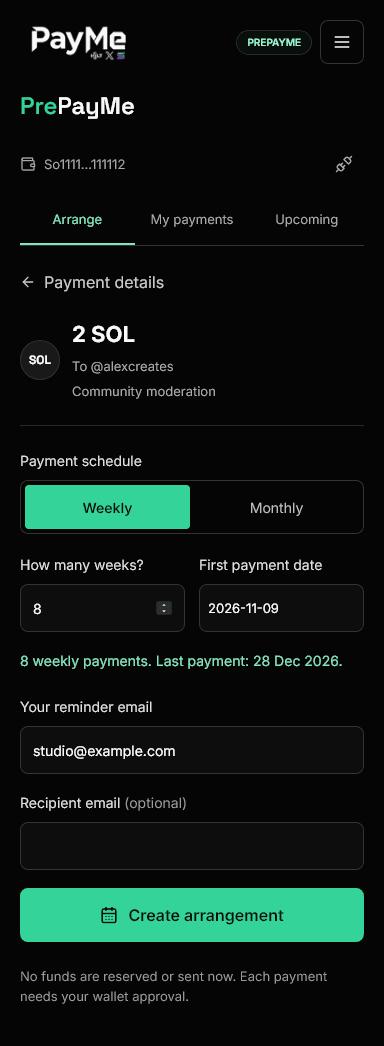
Plan payments to the people you work with: creatives, moderators and community contributors. Choose their PayMe handle, what the payment is for, and an amount in SOL or a supported Solana token, including your own project's token where supported.
Set a single payment date or a weekly or monthly schedule. Email reminders bring you back to PayMe to review and approve each payment in your wallet.
Choose the dates
One payment, or a set number of weekly or monthly payments. Keep the amount and purpose together.
Keep both sides informed
See upcoming and unpaid payments in PayMe. Add the recipient's email to invite them to enable notifications too.
Approve every payment
A reminder, not an automatic debit. Funds are not reserved, and scheduled payments are not guaranteed.
Connect your AI
Listed in the official MCP Registry
One PayMe MCP. Use it where you already talk to AI.
Claude, ChatGPT, Grok, Codex, Gemini tooling and other compatible clients can connect to the same authenticated Hilt endpoint. Client availability and setup differ; the payment boundary does not.
Remote connector
Connect PayMe to Claude
Available on Claude plans that support remote custom connectors.
One endpoint
Hilt PayMe remote MCP
https://api.hilt.so/mcp/pay-meAsk naturally
Send 1 USDC to @handle
Review Hilt
Recipient, amount and fee
Approve in wallet
The AI never signs
Authenticated MCP connector
Ask an AI to prepare the payment.
The connected client resolves the PayMe recipient and prepares exact terms. The payer opens Hilt, reviews the payment and approves it in their wallet.
Public MPP payment action
A wallet-capable agent can pay a verified handle directly.
Post the X handle, amount and SOL or Solana USDC asset. Hilt returns an MPP HTTP 402 charge; the agent validates and signs under its wallet policy, retries the same request and receives a machine-readable receipt. No payer PayMe account, OAuth grant or Hilt API key is required.
Pay a verified handle from an agentHilt is independent from the AI providers shown. Compatibility does not imply a commercial partnership.
Read the connector guide
Create. Share. Receive.
Create it once. Share it anywhere.
Your PayMe page is the receiving product. Connect X, verify your receiving wallet, then share the link or QR. A payer opens the page, chooses a supported Solana wallet and approves the payment. They do not need a PayMe account.
Your verified PayMe
Connect X and verify the receiving wallet you control. Your PayMe link and QR remain tied to that recipient profile.
Share a link or QR
Put PayMe in a bio, DM, invoice, community post or event screen. The payer opens it, connects a wallet and pays.
Free for the receiver
No Hilt fee for receiving. Senders pay 2% on token payments or 0.001 SOL per NFT transfer, plus network and any account creation costs shown before approval.
Protect future wallet changes
Enable Wallet Security with your current wallet, a standard Authenticator app and single-use recovery codes.
One approval, several people
Send native SOL to two to five verified PayMe recipients in one atomic transaction, with one wallet approval.
Hilt Direct Checkout
Your token has a community. Give it somewhere to spend.
Enter one supported Solana token mint, choose a token, USD or SOL-denominated amount, and publish a checkout link or embed. Creating it is free; confirmed payments carry a flat 2% Hilt fee.
What payment can unlock
Sell utility without rebuilding checkout
Each checkout is configured for one chosen token. Hilt validates the payment terms before confirming the unlock.
One product family
Supported by the Alchemy Solana Fund
PayMe
People pay and get paid through verified social identity.
Plan payments to people, with reminders and your approval each time.
Direct Checkout
Token projects publish useful payment links without an account.
Start with the handle people already know